0 ratings

Numéro d'article:
90765268
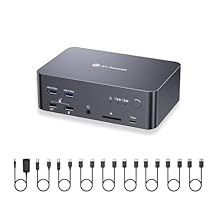
AV Access 8K DisplayPort KVM Docking Station 3 Monitors 2 PCs, with 6 DP Cables, 3xUSB 3.0 Hub, GbE, 8K@60Hz 4K@165Hz KVM Switch Triple Monitors 2
Numéro d'article:
90765268
CDF 905165
Price Details
Excluding Shipping & Custom charges ( Shipping and custom charges will be calculated on checkout )
*All items will import from États-Unis
0 ratings
Écrire un commentaire
En stock
 Importé depuis la boutique USA
QTY:
Commandez maintenant et recevez votre commande aux alentours du Mercredi, Juillet 01
Transaction sécurisée
Ubuy s'engage à protéger votre sécurité et votre confidentialité. Notre système avancé de sécurité des paiements garantit la confidentialité en chiffrant vos informations lors de la transmission grâce aux protocoles AES (Advanced Encryption Standards) et SSL (Secure Socket Layer). Vos coordonnées de paiement sont 100 % sécurisées car nous ne partageons pas vos informations de paiement avec des vendeurs tiers.
nos meilleurs partenaires logistiques


Multitask effortlessly and maximize your productivity like never before.

Livraison
rapide

Retour
gratuit*

Emballage sécurisé

Produits 100 % originaux

Conformité PCI DSS

Certifié ISO 27001


Note: Step Down Voltage Transformer required for using electronics products of États-Unis store (110-120). Recommended power converters Acheter maintenant.


Ce qui se démarque
Triple Monitor Support
The AV Access iDock D23 allows seamless connectivity for up to three monitors, enhancing productivity for multitasking and immersive gaming experiences without sacrificing performance.
High Resolution Output
Supports 8K display via DisplayPort 2.0, offering exceptional video quality for gamers and professionals, ensuring every detail is sharply rendered for an enhanced viewing experience.
Fast Data Transfer
Equipped with USB 3.0 and 1G Ethernet, this docking station provides rapid data transfer speeds and reliable network connectivity, ideal for home office setups and online gaming.
Détails du produit
| Item Weight | 5.5 lbs (2.49 kg) |
À qui est-ce destiné ?

-
Gamers
Ideal for gamers needing high resolution and refresh rates to enhance their gaming experiences across multiple displays.
-
Home Office Users
Perfect for remote workers looking to streamline productivity by connecting multiple devices and monitors seamlessly.
-
Multimedia Professionals
Beneficial for graphic designers and video editors requiring high bandwidth and resolution for detailed work across displays.

-
Casual Users
Not suited for users with basic computing needs who do not require extensive multi-monitor setups.
-
Budget-conscious Buyers
Potentially too expensive for those seeking cost-effective solutions without the need for advanced features.
-
Portable Users
Not intended for travelers or those needing a compact docking solution for use with laptops on-the-go.
DESCRIPTION DU PRODUIT
AV Access 8K DisplayPort KVM Docking Station 3 Monitors 2 PCs, with 6 DP Cables, 3xUSB 3.0 Hub, GbE, 8K@60Hz 4K@165Hz KVM Switch Triple Monitors 2 Desktops, SD, Audio, All-Aluminum, for HP, Dell
Vous avez une question ? Chattez avec nous
Questions et réponses des clients
-
question:
What is the main functionality of the AV Access iDock D23 KVM Switch Docking Station?
répondre: The AV Access iDock D23 KVM Switch Docking Station allows you to seamlessly control two PCs and connect them to up to three monitors. This capability is particularly beneficial for users who need to multitask extensively or use dual operating systems. It is equipped with DisplayPort 2.0 support and includes six DP cables, ensuring optimal image quality and compatibility with current high-resolution displays. For use cases such as gaming, graphic design, or data analysis, this dock facilitates efficient management of multiple projects without the hassle of switching between devices. -
question:
Is the AV Access iDock D23 compatible with Mac and Windows operating systems?
répondre: Yes, the AV Access iDock D23 is compatible with both Mac and Windows operating systems. This cross-compatibility makes it an ideal choice for users operating different systems simultaneously. The docking station offers drivers and plug-and-play capabilities, which simplify the connection process for multiple setups. For professionals working in environments where teamwork is essential, being able to switch between operating systems efficiently can enhance productivity significantly. -
question:
What types of ports does the iDock D23 feature?
répondre: The AV Access iDock D23 features a variety of ports, including multiple DisplayPort inputs, USB connectors, and a gigabit Ethernet port. This selection of ports makes it versatile for connecting peripherals such as keyboards, mice, and network devices. Users can tailor their workstation setup to include all necessary tools for optimal productivity, whether for office work, creative tasks, or gaming setups. -
question:
How does the 8K capability of the iDock D23 enhance viewing experience?
répondre: The iDock D23 offers 8K resolution support, providing a stunningly detailed and crisp display that enhances the visual experience for multitasking and entertainment. This feature is vital for graphic designers and video editors who require precise color representation and high-resolution images. Running multiple displays at this resolution delivers an immersive experience that can elevate gaming and content creation projects significantly. -
question:
What does the inclusion of six DisplayPort cables mean for users?
répondre: The inclusion of six DisplayPort cables with the iDock D23 ensures that users can easily connect multiple monitors without needing to purchase additional cables. This convenience helps save time and costs, making it user-friendly for individuals setting up elaborate workstations or gaming rigs. By having the right cables included, you can start your setup immediately and enjoy a fully configured multi-monitor environment. -
question:
Can I use the docking station to charge my devices?
répondre: The AV Access iDock D23 does not specifically mention charging capabilities for devices through its USB ports. However, it does support data transfer and peripheral connections. Users who need to charge devices should rely on dedicated chargers, while using the dock for high-speed data transmission and streamlined device management. -
question:
Is the AV Access iDock D23 suitable for gaming?
répondre: Yes, the AV Access iDock D23 is well-suited for gaming, particularly due to its 8K support and high refresh rates with DisplayPort 2.0. Gamers can benefit from its ability to switch between two PCs, allowing for a seamless transition between gaming and other tasks without losing performance. Additionally, the multi-monitor setup can enhance gameplay immersion and provide ample screen real estate for multi-tasking applications. -
question:
How do I install and set up the AV Access iDock D23?
répondre: To set up the AV Access iDock D23, connect the docking station to your PCs using the provided DisplayPort cables and ensure it is powered on. Installation typically involves installing any necessary drivers if prompted. Once connected, you can easily switch between devices using the KVM functionality. This straightforward setup is perfect for users who frequently alternate between different workstations or PCs without complicated configurations. -
question:
What practical scenarios benefit from using the iDock D23?
répondre: Practical scenarios for the AV Access iDock D23 include multitasking professionals who run software on two separate PCs or content creators working with multiple tools across different systems. It's also ideal for gamers who want to switch between a gaming setup and a work setup without disconnecting cables. The flexibility in switching along with triple monitor support creates a versatile workspace for various needs. -
question:
Where can I buy the AV Access iDock D23 in Republic of the Congo?
répondre: You can purchase the AV Access iDock D23 from Ubuy in Republic of the Congo. Ubuy offers a user-friendly shopping experience, allowing you to find the docking station easily while providing reliable service and support. Whether you're a casual user or a tech enthusiast, Ubuy ensures that your purchasing needs are met with efficiency.
vAVAccess KVM Switches Editorial Review
**** The AV Access iDock D23 KVM switch has garnered positive attention from users who value reliable performance in professional editing and gaming setups. Users highlight the switch’s support for three 8K DisplayPort outputs, which marks a significant upgrade from traditional 4K solutions. The ability to future-proof workflows with such high-resolution output is appealing for those heavily invested in visual quality. Customer experiences reveal that the D23 excels at providing stable and Consistent video quality without compression or image degradation, even under heavy usage across multiple monitors. The unit's build quality is noted as sturdy, and it arrives equipped with all necessary DisplayPort cables, enhancing convenience for users setting up their systems. On the service side, the customer support has also received commendations, particularly for their responsiveness in resolving connection issues. However, some users have reported initial problems that were related to the cables they were using, emphasizing the importance of using quality, compatible cables for optimal performance. Despite these praises, a few drawbacks have been observed. The audio output has been a concern for some, with instances of popping sounds during boot-up and some imbalance requiring adjustments. The switching speed, while fast and functional, is reportedly not as quick as some competing models. Additionally, the lack of HDMI support could limit compatibility for users with HDMI-centric setups. In summary, the AV Access iDock D23 KVM switch stands out as a versatile and high-quality device for users needing multi-display setups, delivering solid performance and support, albeit with a few minor audio-related caveats and no HDMI options. **
Avis et évaluations clients
1 évaluations des clients
-
5 étoile
100%
-
4 étoile
0%
-
3 étoile
0%
-
2 étoile
0%
-
1 étoile
0%
Donnez votre avis sur ce produit
Partagez votre avis avec d'autres clients
Avantages
- Supports up to 8K resolution via DisplayPort.
- Solid build quality and reliable performance.
- Includes all necessary DisplayPort cables.
- Excellent customer support.
- Variety of ports including USB-C, USB 3.0, and Ethernet.
Les inconvénients
- No HDMI support, limiting compatibility.
Historique des prix du produit
Informations importantes
- Limitations : Pour les produits expédiés à l'international, veuillez noter que toute garantie du fabricant peut ne pas être valide ; les options de service du fabricant peuvent ne pas être disponibles ; les manuels, instructions et avertissements de sécurité des produits peuvent ne pas être dans les langues du pays de destination ; les produits (et les matériaux qui les accompagnent) peuvent ne pas être conçus conformément aux normes, spécifications et exigences d'étiquetage du pays de destination ; et les produits peuvent ne pas être conformes à la tension et aux autres normes électriques du pays de destination (nécessitant l'utilisation d'un adaptateur ou d'un convertisseur le cas échéant). Il incombe au destinataire de s'assurer que le produit peut être importé légalement dans le pays de destination. En cas de commande auprès d'Ubuy ou de ses filiales, le destinataire est l'importateur officiel et doit se conformer à toutes les lois et réglementations du pays de destination.
- Tous les produits listés sur Ubuy ne sont pas à vendre, Ubuy étant un moteur de recherche mondial. Les produits sont soumis aux réglementations en matière d'exportation et de commerce.
CDF 905165
Commandez maintenant et recevez votre commande aux alentours du Mercredi, Juillet 01
This item is not restrict in my country.(Please click on above link if this item is not restrict in your country, So our team will review and allow.)
QTY:
Transaction sécurisée
Ubuy s'engage à protéger votre sécurité et votre confidentialité. Notre système avancé de sécurité des paiements garantit la confidentialité en chiffrant vos informations lors de la transmission grâce aux protocoles AES (Advanced Encryption Standards) et SSL (Secure Socket Layer). Vos coordonnées de paiement sont 100 % sécurisées car nous ne partageons pas vos informations de paiement avec des vendeurs tiers.
nos meilleurs partenaires logistiques
Livraison transfrontalière la plus rapide
Caractéristiques et avantages
- Supports 3 monitors for enhanced productivity.
- Switch seamlessly between 2 PCs with a quick control feature.
- Immersive 8K Ultra HD for gaming, design, and movies.
- Features a powerful 12-in-1 docking station for connecting peripherals.
- Ultra-high refresh rates for smooth gameplay.
- Includes all necessary cables for easy setup.