- Home Page /
- Office Products /
- Office Electronics /
- Printers & Accessories /
- Computer Printers /
- Photo Printers /
- Desktop Photo Printers /
- HP DeskJet 2855e Wireless All-in-One Printer ...
0 ratings




Item #:
244952449
HP DeskJet 2855e Wireless All-in-One Printer Bundle with CPS & Cable
78% of respondents would recommend this to a friend
Item #:
244952449
CDF 370805
Price Details
Excluding Shipping & Custom charges ( Shipping and custom charges will be calculated on checkout )
*All items will import from US
In stock
 Imported from USA store
QTY:
Order now and get it around Tuesday, September 08
Secured transaction
Ubuy works hard to protect your security and privacy. Our advanced payment security system ensures confidentiality by encrypting your information during transmission using AES (Advanced Encryption Standards) and SSL (Secure Socket Layer) protocols. Your payment details are 100% secure as we do not share your payment details with third party sellers.
Our Top Logistics Partners


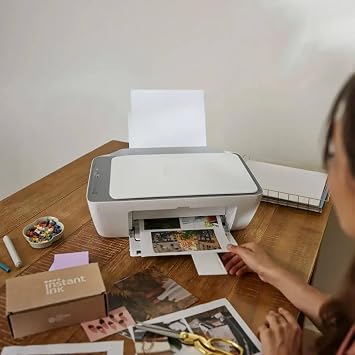
This all-in-one printer delivers the convenience of multiple functions in one compact device.

Fast
Shipping

Free
Return*

Secure Packaging

100% Original Products

PCI DSS Compliance

ISO 27001 Certified



Note: Step Down Voltage Transformer required for using electronics products of US store (110-120). Recommended power converters Buy Now.


Product Details
| Printer Type | Inkjet |
| Other Special Features of the Product | Wireless Printing; Print; Scan; Copy; Easy-to-Use Control Panel; 60 Sheet Input Tray; 25 Sheet Output Tray |
| Printer Output Type | Color |
| Item Weight | 10.4 pounds (4.72 kg) |
| Item Dimensions D x W x H | 19"D x 14"W x 7"H (48.3 x 35.6 x 17.8 cm) |
| Print media | Paper (plain) |
| Scanner Type | Flatbed |
| Additional Printer Functions | All In One |
| Color Pages per Minute | 15 |
| B&W Pages per Minute | 20 |
| Maximum Media Size | Letter (8.5 x 11 inches) |
| Paper Size | Letter inches |
| Printer Connectivity Type | USB |
| Hardware Interface | USB |
| Total Usb Ports | 1 |
| Brand | HP |
| Model Name | DeskJet All-In-One Wireless Inkjet Printer |
| Model Number | DJ2855E |
| Built-In Media | User Manual |
| Model Series | DeskJet 2855e |
| UPC | 850087707657 |
| Unit Count | 1 Count |
| Manufacturer | HP |
| Color | White |
| Connectivity Technology | USB |
| Printing Technology | Inkjet |
| Special Feature | Wireless Printing; Print; Scan; Copy; Easy-to-Use Control Panel; 60 Sheet Input Tray; 25 Sheet Output Tray See more |
| Printer Output | Color |
| Maximum Print Speed (Color) | 15 |
| Max Printspeed Monochrome | 20 |
What's in the box
User Manual
Product Description
Have any Query? Chat with us
Customer Questions & Answers
-
Question:
What are the main features of the HP DeskJet 2855e Wireless All-in-One Printer?
Answer: The HP DeskJet 2855e offers printing, scanning, and copying capabilities all in one device. It features wireless connectivity, allowing you to print from your smartphone or tablet effortlessly. The printer supports various paper sizes and comes with HP's Smart app for easy setup and management. This makes it ideal for home offices or small businesses where space and versatility are vital. -
Question:
How do I connect the HP DeskJet 2855e to my Wi-Fi network?
Answer: You can connect the HP DeskJet 2855e to your Wi-Fi network through the HP Smart app. Simply download the app on your smartphone or tablet, follow the on-screen instructions to set up the printer, and select your Wi-Fi network. This wireless feature allows you to print documents from anywhere in your home, making it convenient for busy households. -
Question:
Can I print from my smartphone using the HP DeskJet 2855e?
Answer: Absolutely! The HP DeskJet 2855e supports mobile printing, allowing you to print directly from your smartphone or tablet. You can use compatible applications like Apple AirPrint or Google Cloud Print. This feature is particularly useful for students and remote workers who need quick access to printed documents on the go. -
Question:
What types of media can I print on with the HP DeskJet 2855e?
Answer: The HP DeskJet 2855e can print on various media types, including plain paper, photo paper, and envelopes. It supports multiple sizes, such as A4, Letter, and Legal. This versatility makes it suitable for both professional documents and personal projects like photo printing or invitations. -
Question:
Does the HP DeskJet 2855e come with ink cartridges?
Answer: Yes, the HP DeskJet 2855e comes with an introductory set of ink cartridges. These cartridges are typically sufficient for basic printing tasks and offer quality results right out of the box. However, you may want to purchase additional or high-capacity cartridges for heavier usage or specialty prints. -
Question:
How can I perform maintenance on my HP DeskJet 2855e?
Answer: To maintain your HP DeskJet 2855e, regularly clean the print heads, and check for software updates via the HP Smart app. Additionally, keep the device clean from dust and paper debris. Performing these maintenance tasks enhances print quality and prolongs the printer's lifespan, ensuring you get consistent results. -
Question:
Is the HP DeskJet 2855e compatible with Mac and Windows devices?
Answer: Yes, the HP DeskJet 2855e is compatible with both Mac and Windows operating systems. The installation process is straightforward, and drivers can be easily downloaded from the HP website. This compatibility allows users across various platforms to enjoy seamless printing and scanning functionalities. -
Question:
What is the best way to resolve printing issues with the HP DeskJet 2855e?
Answer: For resolving printing issues with the HP DeskJet 2855e, start by checking the printer's connectivity and ensuring that there are no paper jams. Restarting the printer and clearing any print jobs from the queue can often resolve minor problems. For persistent issues, the HP support website provides troubleshooting guides tailored to specific problems, ensuring you can get back to printing quickly. -
Question:
Can I use the HP DeskJet 2855e for double-sided printing?
Answer: The HP DeskJet 2855e does not support automatic double-sided printing, but you can manually print on both sides. To do this, print the odd pages first, then reinsert the paper to print on the even pages. This feature is beneficial for reducing paper usage and is ideal for tasks like printing reports or multipage documents. -
Question:
Where can I buy the HP DeskJet 2855e Wireless All-in-One Printer Bundle with CPS & Cable in Republic of the Congo?
Answer: You can buy the HP DeskJet 2855e Wireless All-in-One Printer Bundle with CPS & Cable at Ubuy. They offer a user-friendly platform with a wide selection of products, making it convenient to find exactly what you need.
HP Desktop Photo Printers DJ2855E Editorial Review
HP DeskJet 2855e Wireless All-in-One Printer Bundle with CPS & Cable is a versatile inkjet printer ideal for home or small office use. It features wireless printing capabilities, allowing you to print from various devices effortlessly. With the ability to copy, scan, and print, this all-in-one printer meets multiple needs in one compact unit. Users appreciate the easy-to-use control panel and the generous input/output trays while enjoying the convenience of a weight of just 10.4 pounds. The printer excels in producing color pages at 15 pages per minute and black-and-white pages at 20 pages per minute, making it a reliable choice for everyday printing tasks. It also accommodates letter-sized media, ensuring a wide range of printing options to suit different projects.
Customer Reviews & Ratings
6 customers ratings
-
5 Star
61%
-
4 Star
0%
-
3 Star
0%
-
2 Star
0%
-
1 Star
39%
Review this product
Share your thoughts with other customers
Pros
- Wireless printing for convenient access
- Compact design fits in small spaces
- Easy-to-use control panel
- Accommodates various print media sizes
- Fast printing speed for both color and B&W
Cons
- May require frequent ink cartridge replacements
Platform Trust & Buyer Confidence

MA
Mohammad
Verified buyer
“Excellent quality and original too,when ubuy send original things I will appreciate that ,I very satisfied thank you”
23 July 2026 · via Trustpilot
CK
Chitra
Verified buyer
“The order and delivery progress was communicated very well. Package arrived within the estimated time. Products arrived as expected in good condition.”
22-Jul-26 · via Trustpilot
K
kund
Verified buyer
“Good supply of products. Safe payment methods, and shipment worldwide! Genuine products.”
23-Jul-26 · via Trustpilot
OO
Onesi
Verified buyer
“Was my first time buying a product from Ubuy, but I found it so helpful. This is reliable. Gonna place a new order!”
22 July 2026 · via Trustpilot
SJ
SAO JOHN
Verified buyer
“Ubuy is a great online platform to buy stuff. Reliable, fast delivery time and great value for money. I've been using Ubuy online shopping platform for three years now and will continue to do so.”
23 July 2026 · via Trustpilot
Secure Checkout
Global Delivery
Easy Returns
Genuine Products
Product Price History
Important information
- Limitations : For products shipped internationally, please note that any manufacturer warranty may not be valid; manufacturer service options may not be available; product manuals, instructions, and safety warnings may not be in destination country languages; the products (and accompanying materials) may not be designed in accordance with destination country standards, specifications, and labeling requirements; and the products may not conform to destination country voltage and other electrical standards (requiring use of an adapter or converter if appropriate). The recipient is responsible for assuring that the product can be lawfully imported to the destination country. When ordering from Ubuy or its affiliates, the recipient is the importer of record and must comply with all laws and regulations of the destination country.
- Not all the products listed on Ubuy are for sale, as Ubuy is a global search engine. Products are subject to export/trade regulations.
CDF 370805
Order now and get it around Tuesday, September 08
This item is not restrict in my country.(Please click on above link if this item is not restrict in your country, So our team will review and allow.)
QTY:
Secured transaction
PCI DSS compliant and ISO 27001:2022 certified, with encrypted payments and full buyer protection on every order.
Our Top Logistics Partners
Fastest cross-border delivery
Features & Benefits
- Complete wireless all-in-one printer bundle for versatile tasks.
- Includes a USB printer cable for reliable wired connectivity.
- Features 3 months of Instant Ink for uninterrupted printing.
- Compact design perfect for homes, offices, and smaller spaces.
- 12-month CPS extended warranty for added peace of mind.
- Ideal for students, remote workers, and families needing dependable printing.
Ubuy Assurance
Experience worry-free shopping with 100% original products, PCI DSS-compliant payment security, ISO 27001-certified data protection, the fastest cross-border delivery, free returns *, and secure packaging on every order.